Multicam
Front and rear cameras together at 1080p30 HEVC on supported iPhone hardware.
Record the trail with speed, pitch, roll and more in your video.
Vehicle readings require an optional compatible adapter.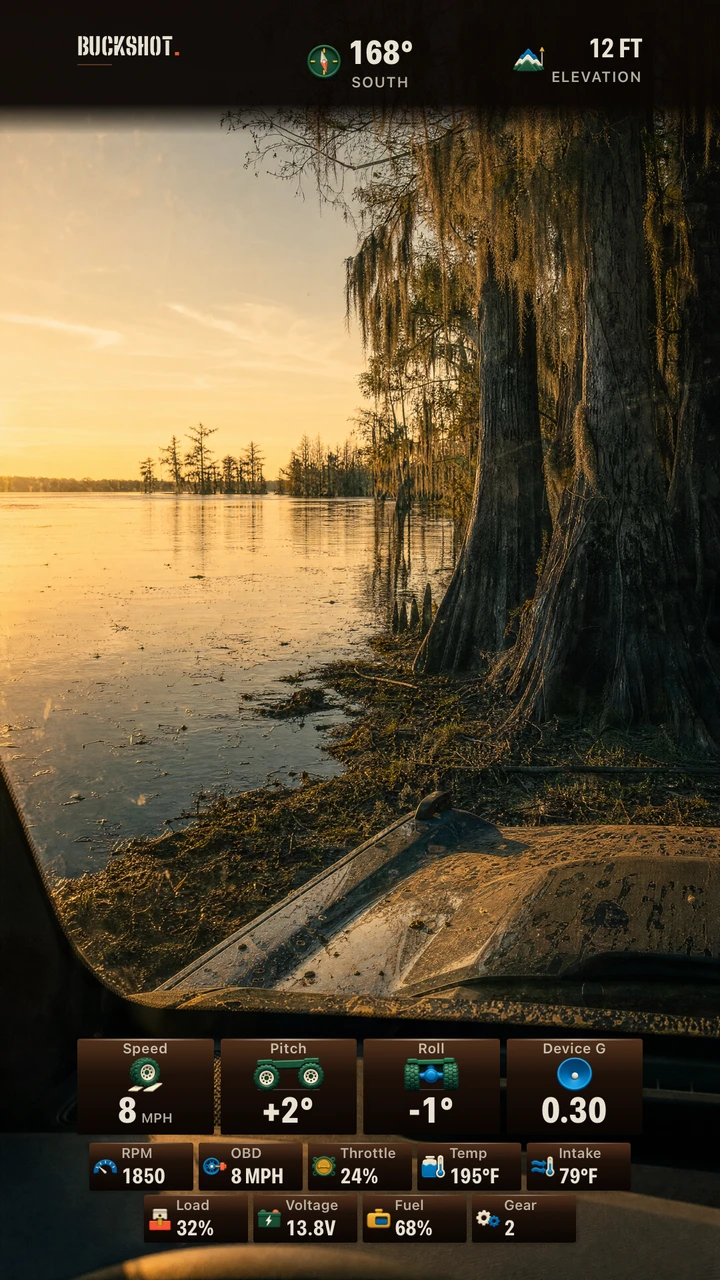 Current HUD · sample readings
Three clear ways to start recording. Pick the moment, then let BuckShot carry the camera work.
Front and rear cameras together at 1080p30 HEVC on supported iPhone hardware.
Record the rear-camera view in ProRes 422 LT for editing, on supported iPhones.
Uses a lower hardware-load target, with heat warnings and screen dimming. Recording quality does not automatically change.

Export trail video with your selected readings in frame: speed, altitude, heading, pitch, roll, and G. Connect a compatible OBD-II adapter to bring the vehicle into the story, too.
Warm copper and bronze for wet green routes.
Choose the data that matters for this ride. Phone readings work on their own. Add the vehicle readings you want with a compatible adapter. Selected readings with no available data stay gray and still.
Export trail video with the phone and optional vehicle readings that matter for this ride.
On supported Action Button iPhones, save a recent rear-camera clip while the camera is running. Recall clips have no audio, front-camera view, or telemetry overlay.
A separate LiDAR tool for live distance readings. Save a snapshot with readings on supported Pro iPhones.
Save recorded clips to Photos or share an export when it is time to replay the route.
Apple sign-in is optional. Record, use telemetry and save rides without an account. BuckShot and BuckUp share an account when you use the same Apple account; signing in does not import a vehicle or sync rides.
Two-step shared account deletion removes the shared BuckShot and BuckUp account and associated cloud data. Local recordings and Photos copies remain. Get account help or read our privacy policy.
Email us to request a TestFlight invitation. Requires iOS 18 or later; availability and camera options vary by iPhone.
Request beta accessBack to top